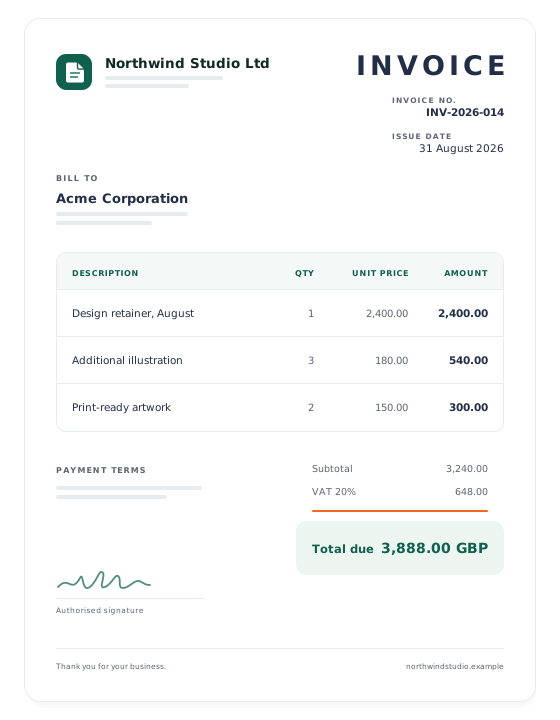
A clean invoice template you can fill in below and download as a PDF, or generate from your own data with one API call. Line items, tax, payment terms and your own branding.
An invoice is the document that gets you paid, so it has to do two jobs at once: satisfy whoever reviews it inside your client's accounts payable team, and stand up if a tax inspector asks for it three years from now. This template covers both. Fill it in below and download the PDF, or send the same fields to the API and generate one for every order your app processes.
Nothing is stored: the document is rendered when you press the button and streamed straight back to your browser.
Rendered by headless Chromium — what you see is what prints.
A4 or Letter, your own logo, no watermark on paid plans.
The same document is available through the API for your app.
Example output — every field on this page is editable.
Working with this template
What is on the page
Issuer and client blocks, invoice number, issue and due dates, line items with quantity and unit price, subtotal, a tax line you can relabel to VAT, GST or sales tax, the total due, and free-text payment terms. Amounts are computed for you as you fill the form in.
Your own branding
Through the API you can pass your own HTML instead of the stock layout, or override the header with your logo and colours. Paid plans render without a watermark, so the PDF that reaches your client carries only your brand.
Numbering that holds up
Invoice numbers must be unique and, in most of Europe, sequential with no gaps. Generate the number in your own database — a sequence or an ordered counter per year — and pass it in. Never derive it from a timestamp or a random string.
Tax and legal fields
Which fields are mandatory depends on where you invoice from. The checklist below covers the common core across the UK, the EU and the US; add your VAT or company registration number where your jurisdiction requires it.
One call per order
Post the order data to /api/v1/render with the template id and get the PDF back in about 0.6 seconds. For nightly billing runs, send up to 100 invoices in a single batch call and collect the results from the webhook.
After it is generated
Attach the bytes to your outgoing email, push them to object storage, or let PDFGeny keep the document and hand your client a download link. Stored documents expire on a schedule you choose.
What the finished document has to contain
The word “Invoice”
Sounds trivial, but in several jurisdictions a document that does not identify itself as an invoice is not one. Keep it visible at the top.
A unique invoice number
Unique across your whole history and, in the EU and the UK, sequential. Gaps invite questions during an audit.
Issue date and supply date
The issue date drives payment terms; the supply date drives which tax period the invoice falls into. They are often different — show both if they are.
Full details of both parties
Your registered name and address, plus your client's. Trading names alone are not enough if your registered name differs.
Tax registration numbers
Your VAT or GST number where you are registered. For cross-border sales inside the EU you also need the customer's VAT number and a note on the reverse-charge rule.
A line for every item
Description, quantity, unit price and line total. One lump sum is acceptable to almost nobody in accounts payable and slows payment down.
Tax shown separately
Net subtotal, the tax rate applied, the tax amount, then the gross total. If different lines carry different rates, show the split.
The amount due and the currency
State the currency explicitly. “1,200.00” means three different things to a client in London, Frankfurt and New York.
Payment terms and how to pay
Due date, accepted methods and the account details. An invoice without a due date is a suggestion, not a request for payment.
About this template
Most teams meet this document twice. The first time, someone needs a single invoice today and fills in a form like the one above. The second time, the same company is sending four hundred invoices on the first of every month and nobody wants to touch a form at all. The template on this page is the same document in both cases — the only thing that changes is whether you type the fields or post them.
The layout is deliberately conservative. Accounts payable software and the humans who operate it are not looking for a design statement; they are looking for the invoice number, the total and the due date, and every second they spend hunting for one of those is a second your payment is delayed. So the number sits top right where it is scanned first, the total sits alone in a tinted block, and the line items are ruled rather than boxed so that a long description does not break the grid.
If you are automating, the field names in the API example match the form exactly, which makes the migration from “we fill this in by hand” to “our app does it” mechanical. Map your order model onto those keys once and the same call serves both a one-off invoice and a monthly billing run.
Common questions
Is this invoice template really free?
Yes. You can fill in the form on this page and download the PDF without an account, up to a few documents a day. A free API key raises that to 50 documents a month for automated use.
Can I add my own logo?
Through the API, yes — pass your own HTML for the document, or override the header block with your logo and brand colours. The form on this page uses the stock layout so that it works without an account.
Is the PDF valid for tax purposes?
The layout carries every field commonly required in the UK, the EU and the US, but the mandatory set depends on your jurisdiction and on whether you are registered for VAT or GST. Check the checklist above against your local rules, and speak to your accountant if you invoice across borders.
How do I number invoices correctly?
Keep the sequence in your own database and pass the number in. A per-year counter such as INV-2026-014 is easy to audit. Do not use timestamps, random ids or the customer's order number on its own — none of them guarantee a gap-free sequence.
Can I generate hundreds of invoices at once?
Yes. The batch endpoint takes up to 100 documents per call and returns them together, or notifies your webhook when the run finishes. That is the usual shape of a monthly billing job.
Do you store the invoices I generate here?
No. Documents rendered from this page are streamed back to your browser and dropped. Through the API you can opt in to storage and get a download link with an expiry you set.
What about credit notes and refunds?
Issue a separate credit note that references the original invoice number rather than editing or deleting the invoice. An issued invoice should never change — that is the whole point of the sequential numbering.
Generate this document from your own data
One POST request returns the finished PDF. Free plan: 50 documents a month, no card required.